Purpose and entry points
Assistant is a core business work area at /app/<orgSlug>/assistant.
It answers questions using records the signed-in person can currently read.
Availability is governed by the platform's disabled, pilot or active policy;
a visible business module does not automatically make every record readable.
Assistant is also available in the native workforce app where admitted.
The opening screen presents a question field, work-area suggestions and recent conversations. A conversation is created when the first question is submitted. The conversation rail can collapse; on narrow screens it overlays the reading area. The composer remains alongside the current run's status, Stop and Retry controls. A later successful answer clears an earlier retry prompt.
Use Assistant to discover available work areas, search or page through supported collections, read a record, follow supported relationships, inspect visible work and permitted audit evidence, and ask source-supported Ticketing sales questions. The available collection list is the useful boundary: an inaccessible collection or unsupported operation is not permission to infer an answer.
Asking and following evidence
- Select the correct workplace and open Assistant.
- Ask a concrete question, including dates, location or record identity where useful.
- Resolve any ambiguity, such as Events with the same title on different dates.
- Read the completed answer and its source evidence.
- Use an offered source button to continue in the owning work area.
Answers are buffered until source permission checks complete. The current screen shows work in progress rather than a partially authorized streaming answer. Evidence links and up to three source actions belong to the answer that produced them. Opening a source is navigation; it does not perform the business action. Buttons use server-resolved destinations rather than URLs invented by the model.
A source search can be paginated or incomplete. A count of loaded records is not a total. Sales, committed capacity and attendance have different meanings. Ticketing comparisons require permission for every included Event, and forecasts are conditional scenarios with stated evidence limits. Relative dates use the workspace timezone and the run's server observation time.
Reviewing an Event or Booking proposal
Embedded Assistant supports two reviewed creation commands:
| Proposal | What confirmation does | What remains separate |
|---|---|---|
| Draft Event | Saves an unpublished Event and any explicitly specified finite ticket product | Publishing the Event, later communication and collection |
| Standard Booking | Creates an eligible same-day, single-resource free or pay-on-arrival Booking through Bookings | Complex itineraries, unsupported payment collection and other specialist changes |
The review card shows the exact proposed values, timezone, financial consequence, version and expiry. Missing price or capacity never means free or unlimited. A proposed Booking does not reserve capacity; confirmation rechecks availability.
Use Edit to ask for a revised version, Cancel to abandon the proposal, or Confirm to approve the displayed version. Editing or another conversation turn supersedes the pending version. Typing agreement in conversation is not an approval. A failed, cancelled or unfinished response cannot expose confirmation.
Proposals expire after fifteen minutes. Confirmation rechecks identity, current workplace access, source permissions, rollout policy and source facts. Changed facts require fresh review. Retrying a confirmed proposal retrieves its original outcome rather than creating another Event or Booking. Deleting its conversation does not delete the resulting business record.
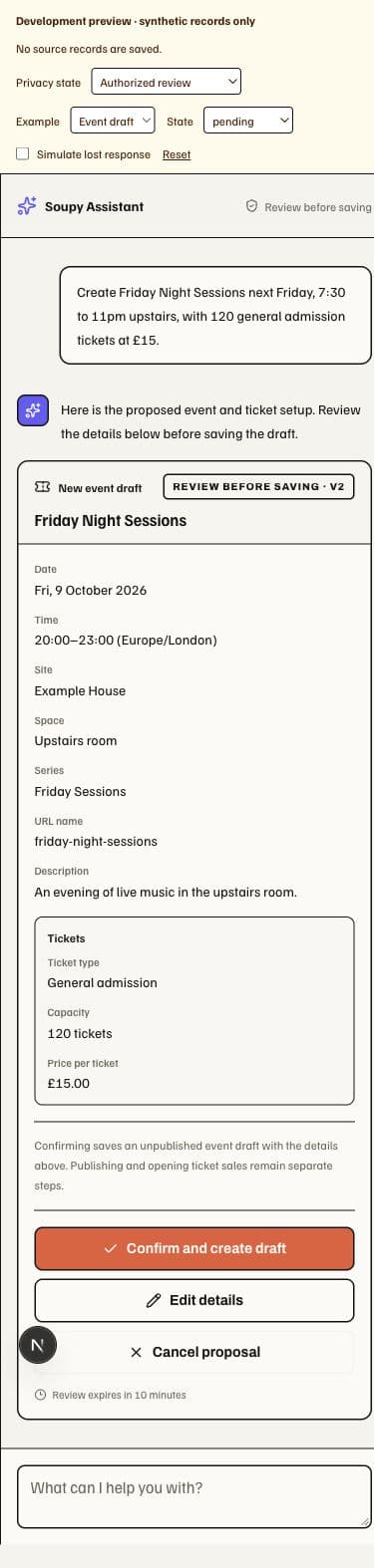
- Proposal version: the revised card is the version the person reviews.
- Unpublished consequence: Event creation saves a draft; publication remains a separate action.
- Confirm, Edit and Cancel: each choice acts on this specific proposed outcome.
- Expiry: an expired proposal requires a fresh review before execution.
Privacy, history and failure
Saved answers, evidence and proposals are checked against current source access when read again. A person can lose access to an old answer after membership, record scope, source content or permission changes. Older text without adequate source provenance remains unavailable; asking again reads current facts. Connection loss and identity changes hide protected retained content. Current source authority, including inherited history, is rechecked after prompt preparation immediately before each model invocation. Answers stay buffered until the final permission check; a later access change cannot recall data already sent.
Follow-up questions use authorized plain-text history; prior tool payloads are not blindly replayed. Assistant cannot use a private email, private channel, hidden guest detail or payroll field merely because the person once discussed it. Organization and principal identity are supplied by Soupy, not by prompt text. There is no unrestricted database tool or automatic cross-conversation memory.
One run can be active per conversation. Quotas, tool limits and deadlines can stop a run. A run without a complete saved answer is a retryable failure, not a success. The current policy defaults to ninety-day conversation/evidence retention; conversation deletion removes first-party conversation state and its Agent thread.