Tickets, extras and everyone behind the event.
One event. Every seller connected.
Put a clear ticket on every guest’s phone. Assign ticket inclusions and optional extras to the right sellers, pre-sell artist merch and keep the whole event connected from checkout to collection and check-in.
In the product today
Mobile tickets, eligible Wallet saves, ticket inclusions, optional add-ons, merchandise collection and event operations. Multi-seller checkout requires enabled, compatible Payment Profiles and ready payment accounts; native Wallet passes require configured issuers.
See what’s nextThe guest side
A proper ticket.
Right in their pocket.
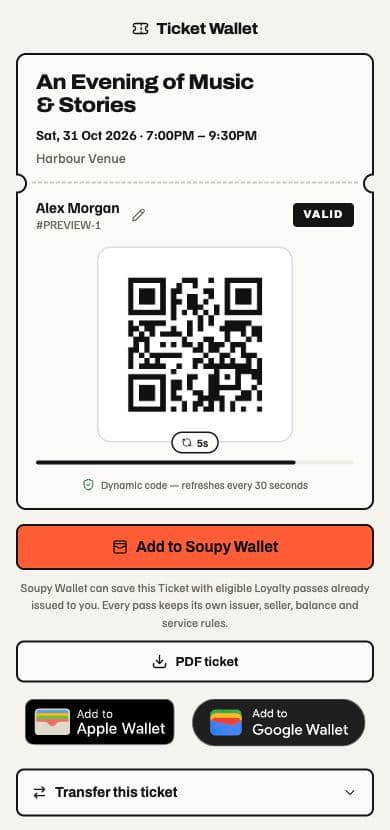
The sale is only the start. Give every guest a clear mobile ticket, with their details, their QR and their next steps in one place.
Everything they need at the door.
Event, date, time, venue and attendee name sit together with the live admission QR. One ticket, ready to show.
Open it. Save it. Print it.
Guests can open their ticket on mobile, download an eligible PDF, or save to Apple Wallet and Google Wallet when enabled.
Plans change. Tickets can follow.
Eligible guests can edit an attendee name or transfer a ticket. Those actions stay separate from saving it, and follow your event’s rules.
Native Wallet saves require a configured issuer. PDF, name changes and transfers depend on the ticket’s policy and current status.
One event. More than one business.
Every item.
The right seller.
Split a ticket into priced inclusions. Add food, drinks or artist merch on top. Assign each item to its own seller and bring it all together in one checkout.
The promoter sells admission. The venue supplies the drink. The artist pre-sells the T-shirt. Each keeps their own part of the sale.
One gig. Your seller mix.
Change a seller or remove an extra to see the split.
Admission and an included drink. Both are inside the ticket price.
Chosen separately. Each adds to the customer’s total.
Customers see who sells each item before paying.
- PromoterAdmission£20
- VenueWelcome drink£5
- ArtistArtist T-shirt£25
- Food traderPre-show supper£12
The same seller profile groups into one charge. Different profiles receive separate direct charges.
Illustrative prices before any applicable fees. These controls only change this example; they do not configure an event or take payment.
Sell the merch
before the doors open.
Offer T-shirts, records or posters with their own variants, prices and sales limits. Assign the sale to the artist’s seller profile and tell fans where to collect.
At the show, staff scan the web voucher, check the item and confirm the handover.
How add-ons and collection workMulti-seller checkout needs enabled, compatible seller Payment Profiles in the same business group, country and currency, with ready payment accounts and an appropriate seller limit. Each included line goes to one seller; any unassigned ticket balance stays with the event seller.
The Events workspace with sales summaries, series performance and the event schedule. Switch to Orders or Attendees and search the sample records.
Current workspace layouts with sample data. Nothing is saved or sent.
01 · Work area
Events
Operate publishing, sales and event delivery from the live series.
All sales
Overall performance across 2 series and 3 ticketed events.
- Gross sales
- £1,710.00
- Tickets sold
- 128
- Sell-through
- 40%
- Events selling
- 2
Across 3 ticketed events
192 remaining capacity
320 total ticket capacity
1 draft in preparation
Series performance
A separate sales snapshot for every series.
Event schedule
| Event | Date | Status | Sold | Revenue |
|---|---|---|---|---|
| Friday Comedy Club | 18 Sep · 19:30 | Live | 86 / 120 | £1,290.00 |
| Sunday Sessions | 20 Sep · 16:00 | Live | 42 / 80 | £420.00 |
| Friday Comedy Club | 25 Sep · 19:30 | Draft | 0 / 120 | £0.00 |
Based on the current Ticketing workspace. Search and switch views using sample records. Nothing is saved, sent or charged.
On the other side of the shift
Less friction. More getting on with it.
- 01
Give guests a mobile ticket with their details, live QR and save options.
- 02
Bring admission, venue extras and artist merch into one disclosed checkout.
- 03
Keep each seller’s charge and each guest’s collection or entry connected.
What’s included
Made for the job.
The practical details behind the promise. Built around the people doing the work, and connected to the information they need.
- 01
Tickets ready for a phone
Show event details, holder and live QR together. Guests can download an eligible PDF or save to Apple and Google Wallet with configured issuers; name changes, transfers and resale follow the ticket’s rules.
- 02
Split the ticket by included item
Price each inclusion and assign its whole line to a seller: admission to the promoter, a drink to the venue, a meal to the food trader. Included amounts stay inside the ticket price; the event seller keeps the remainder.
- 03
Add-ons and artist merch presales
Offer optional food, drinks and merchandise with variants, prices and sales limits. Assign each add-on’s seller, explain collection and let staff confirm handover from its web voucher.
- 04
One checkout, clear seller charges
Customers see who sells each item before paying. Lines for the same Payment Profile share a charge; different eligible profiles receive separate direct charges with their own seller, fees and terms.
- 05
The programme, the door and the follow-up
Run one-off events or recurring series, capacity, waiting lists, scanner check-in and guest communications. With Bookings enabled, a ticket can also include a configured table reservation.
Part of the bigger picture
The context comes with it.
The guest, the venue, the team. Useful information should follow the work. Ticketing connects to shared records, with access controlled for your organisation and your people.
A clear picture
Today. And what’s next.
Mobile tickets, eligible Wallet saves, ticket inclusions, optional add-ons, merchandise collection and event operations. Multi-seller checkout requires enabled, compatible Payment Profiles and ready payment accounts; native Wallet passes require configured issuers.
Automatic visit upsell recommendations remain product direction. Configured ticket inclusions, optional add-ons and merchandise presales for collection are existing capabilities; add-on shipping and native add-on passes are outside this implementation.
Good questions
Ticketing FAQs.
Can one event sell for several vendors?
Yes. Assign each priced ticket inclusion and each optional add-on to its seller Payment Profile. One included line goes to one seller; the event seller keeps any remaining ticket amount. Matching profiles share a charge and different profiles receive separate direct charges. Multi-seller checkout must be enabled, within its configured seller limit, with ready profiles in the same business group, country and currency.
Can artists pre-sell merchandise with tickets?
Yes. Offer merchandise as optional add-ons with variants, prices, sales limits and collection instructions, assigned to the artist’s eligible seller profile. Fans choose before payment; staff review the web voucher and confirm collection at the show. Shipping and native add-on Wallet passes are not included.
What does the guest receive on their phone?
A private mobile ticket with the event, holder and live admission QR together. PDF download, Apple Wallet and Google Wallet are available when the ticket policy and provider setup allow them. Eligible name changes, transfers and resale remain separate actions; an unavailable native save leaves the live web ticket available.
Does this still cover running the event?
Yes. Series, event dates, ticket types, capacity, waiting lists, orders, attendee communications, scanner check-in and aftercare remain connected. With Bookings enabled, a ticket can include a configured table reservation; completed orders can also contribute to entitled CRM, Loyalty and Automation workflows.
Start with the pressure point