Add-ons are workspace-owned optional purchases reused by Ticketing and Bookings;
there is no separate Add-ons module entitlement. Open either product's Add-ons
workspace to use Library, Collection and Sales as permitted.
Catalogue management uses bookings.pricing.manage or
ticketing.events.manage and checks every contributing Site. An Event or Booking widget adopts exact published item versions.
Catalogue, offers and customer purchase
- In the Library, create an item, its variants, Site availability, price/tax, quantity limits, uses per unit, sales quota and collection instructions.
- Choose the seller Payment Profile and publish the item version.
- In the Event's Optional add-ons or widget offer editor, select and order the eligible published versions, then publish that offer.
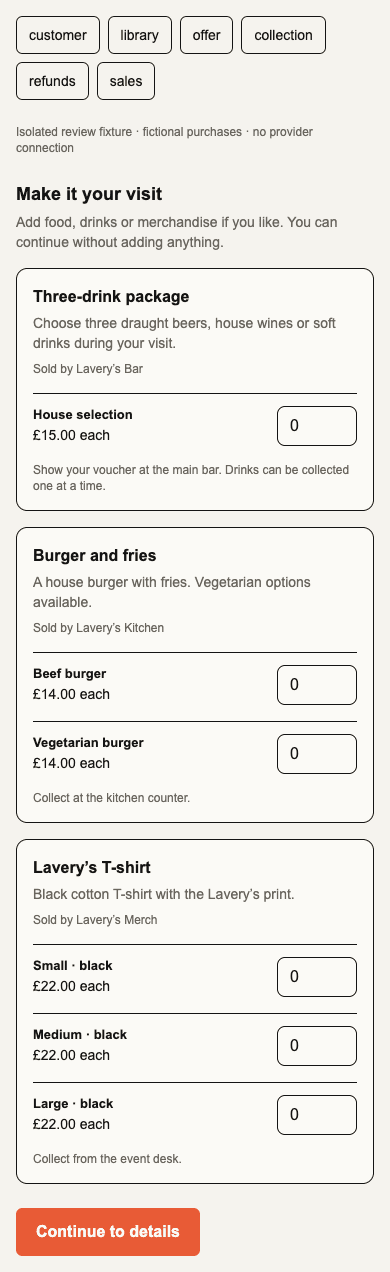
- A customer chooses add-ons after their tickets/activity and before payment. Nothing is preselected; no eligible catalogue means no extra step.
- Review the seller split and total, then complete checkout. Each required seller's payment must succeed before vouchers become usable.
Event managers can open Sell → Optional add-ons, including a direct
view=addons link, to manage the Event’s separate offer. Without Event-management
access that view falls back to an available Event page; its URL grants no access.
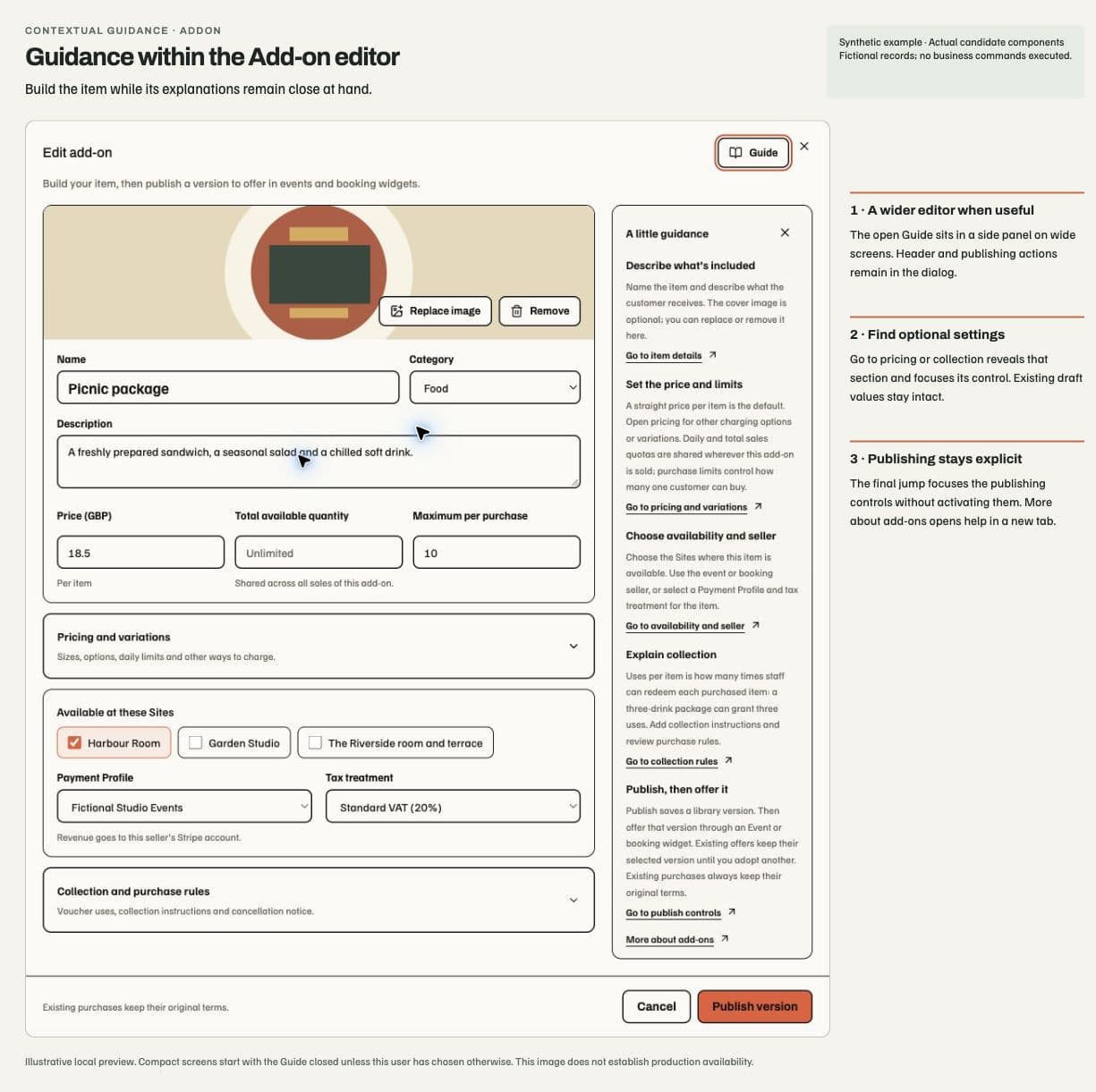
The web New add-on and Edit add-on dialog builds one item card: an optional cover image, title, category and description, followed by its price and quantities. New items start with one Standard option charged per item. A blank sales quantity is unlimited; zero total sales quantity remains a valid limit. Site availability, seller Payment Profile and tax treatment stay visible.
Pricing and variations opens the currency, charging basis, option labels, option prices and daily limits. Existing complex pricing opens this section for editing; closing it keeps every option and its values. Collection and purchase rules holds uses, collection instructions, minimum quantity and cancellation notice. Per-booking charging uses quantity one while retaining the other quantity draft for switching back. Invalid fields inside a closed section reveal it.
Guide beside New/Edit add-on explains the item, pricing/limits, availability/seller, collection and publication. Pricing guidance follows the charging basis and number of variations. Sales quotas apply across offers; purchase limits apply to one purchase. Uses per item describe redemption, not sale quantity. Publishing creates a library version; offering it through an Event or booking widget remains a separate step. Existing purchases retain their terms. Go to… opens required disclosures and focuses existing controls without changing the draft or triggering publication. Full help opens separately.
The optional guide shares the Event editor's per-user, browser-local Show/Hide behavior, stored separately for Add-ons. No business data enters that preference. At viewport widths of 1024px or more, the open guide expands the dialog to at most 960px; the 240px rail needs a content container of at least 896px. Smaller screens keep the compact dialog and an expandable guide above the form. The header/footer remain fixed, with one scrolling body and the existing focus trap. Pending-action and access restrictions still apply. This prepared candidate adds no native guidance or backend permission; deployment is separate.
The image is optional: choose or drop a JPEG, PNG or WebP up to 4 MB. Uploading prepares the image for the draft; Publish version remains an explicit action. A failed upload retains the previous image, and failed publication retains the form with a neutral inline error. Pending publication or upload locks repeat actions and closing. Current access and source changes still retire private editors; a disclosure does not extend access or start publication. The same editor serves the Library and creation from an offer. Native screens are unchanged.
Optional purchases increase the total; included ticket benefits stay inside the ticket price. Lines with the same Payment Profile share one charge, while distinct compatible profiles use disclosed separate direct seller charges. Cross-seller Booking purchases require online collection. Historical Booking Extras retain their identity and share the same capacity authority after adoption.
Sales quotas count holds and sold quantities. They do not claim physical stock accuracy. Editing a catalogue price does not rewrite an adopted offer or sold terms; retiring/removing availability can close future sales while preserving existing purchases.
Hand over, correct and refund
Open the collection list or scan a voucher QR, review the exact item and remaining uses, enter the handover quantity and explicitly confirm. Scanning alone consumes nothing. A three-use drinks entitlement can be handed over in separate visits. The same atomic command powers list and QR redemption and preserves history.
Collection defaults to Live. Test mode must be selected explicitly and displays
a practice warning. addons.fulfil grants Site-scoped handover, while
addons.fulfil.manage governs corrections. These rights do not grant admission
or finance access. The Web Wallet projects the balance; Add-ons owns it.
An add-on-only refund reverses the selected purchased quantity and tax, revokes unused uses and retains completed handovers. Partly used packages need explicit manager review. Refunds use the original seller and frozen fee evidence. Whole Order refunds revoke all remaining uses; refunding a prepaid extra does not quietly remove the unpaid venue balance.
Sales reporting separates base and optional revenue and applies complete Order finance access before counting a sale. Native add-on passes, offline redemption, shipping and stock-system integration are outside this implementation.