Orders are the shared commercial record behind admission, Bookings and optional purchases. A product owns its fulfilment; the Order owns its reservation, confirmation, collection and refund lifecycle. Read Orders from the product's own workspace so the list preserves its source context.
Order service and payment state
An Order detail shows original purchase context, purchaser where authorised, line items, total, customer and platform fees, VAT, ticket/booking fulfilment, payment/refund state and history. A later ticket date swap retains original sale identity and separately labels its current fulfilment event.
A quote is not a reservation. A reservation is not a completed sale. Stripe's browser success is not Soupy fulfilment. Only canonical confirmation can issue usable tickets or confirm paid inventory; late incompatible payments enter reconciliation/refund instead of reviving released capacity. Reload/retry uses the existing operation identity where supported.
For pay-on-arrival visits, payment_due records the outstanding obligation
without paid-sales evidence. Partial collection retains the total and balance.
A refund request or provider attempt is not proof that the customer received money.
Configure Payments & fees
The organisation's Settings → Payments & fees contains connections and versioned Payment Profiles. A Stripe connection alone is not a published seller policy. For each Live or Test profile:
- Select the connected account and profile identity.
- Choose Workspace Legal Entity or Independent seller account, then supply the required seller/legal/tax evidence.
- Review VAT treatment and customer fees: none, fixed per Order, fixed per ticket or percentage; determine itemised versus included display.
- Review customer policies and any invoice policy intent, then publish.
- Set the main Ticketing profile or an explicit Series/Event override.
Inheritance runs Legal Entity → Series → Event unless an exact override is published. Resetting an override restores inheritance while retaining history. Current Orders keep frozen seller, tax, fee, terms and account evidence. Invoice policy intent does not by itself enable invoice checkout.
Soupy platform fee authoring belongs to Platform Control, not the tenant payment form. Authorised tenant finance users can inspect accepted commercial terms and posted fee activity. Seller customer fees and Soupy platform fees are different commercial decisions.
Separate seller charges and refunds
A qualifying basket may contain several published seller Payment Profiles in one Group, country and currency. Buyers see each paid business before payment. Each seller receives its own direct charge and seller Order. The source Ticket Order reserves admission; a zero-residual source Order is internal fulfilment and creates no extra seller charge. All required seller legs must succeed. A partial capture follows compensation/reconciliation before held capacity is released or the purchase is presented as complete.
On the public web payment screen, each seller card lists its purchased items and payable amounts alongside the seller's charge, with quantities for multiple units. An item + item summary sits above the Basket total. These amounts use the frozen purchase: included items allocate the existing ticket price, optional purchases add to it, and any buyer fees appear once. Historical purchases with incomplete or inconsistent item evidence keep their transaction title and total without guessed item prices.
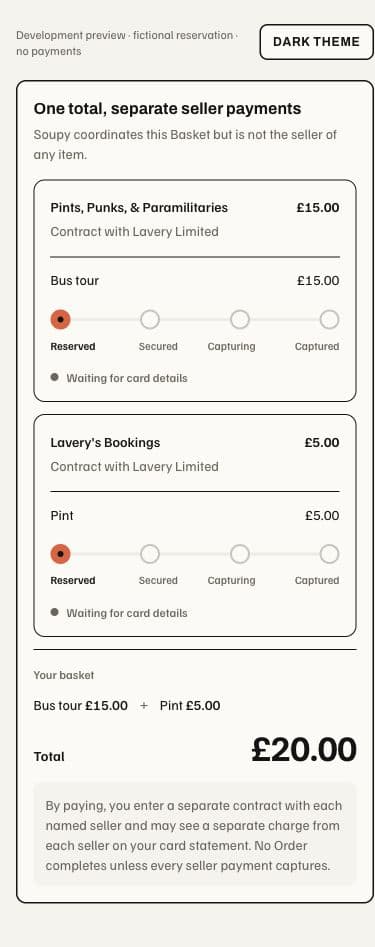
An included item assigned to the Event's own effective Payment Profile stays on the Event's charge. Quote and reservation compare that same published Event configuration: only included items routed away from the Event reduce its residual amount. Changing the published configuration between quote and reservation requires a fresh checkout.
To refund an eligible Order, open Refund order, review refundable lines, amount, fee policy and source account, record a reason, then confirm the governed action. Provider confirmation completes money effects. Free/provider-free voids, venue-collected money and online refunds retain their own evidence paths. Refund operations must not be replaced by editing totals or deleting tickets.
| Financial surface | Meaning and authority |
|---|---|
| Orders | commerce.orders.view reads exact source Orders; source/module restrictions still apply. |
| Refunds | commerce.refunds.manage authorises governed refunds in the relevant scope. |
| Payments & fees | payments.view / payments.manage are separate from event-editing rights. |
| Receipt / VAT invoice | Review and send retained payment documents for an already-paid Ticket Order; this is not invoice checkout or a new receivable. |
| Ticketing Reports | Retained sales, commercial terms and ledger-derived statements; finance/report capabilities govern access. |
| Live settlements | Review simulation, agreement, plan approval and execution readiness; configuration and approval are separate from an executed provider transfer. |
Receipt/VAT documents use the sale's frozen legal/tax evidence. Reports separate ticket revenue excluding retail VAT, seller retail VAT, gross customer sales, Soupy fee net and Soupy output VAT. Calendar-month statements and CSVs are ledger-derived; they do not imply a new month-end bill. Currencies are not merged.