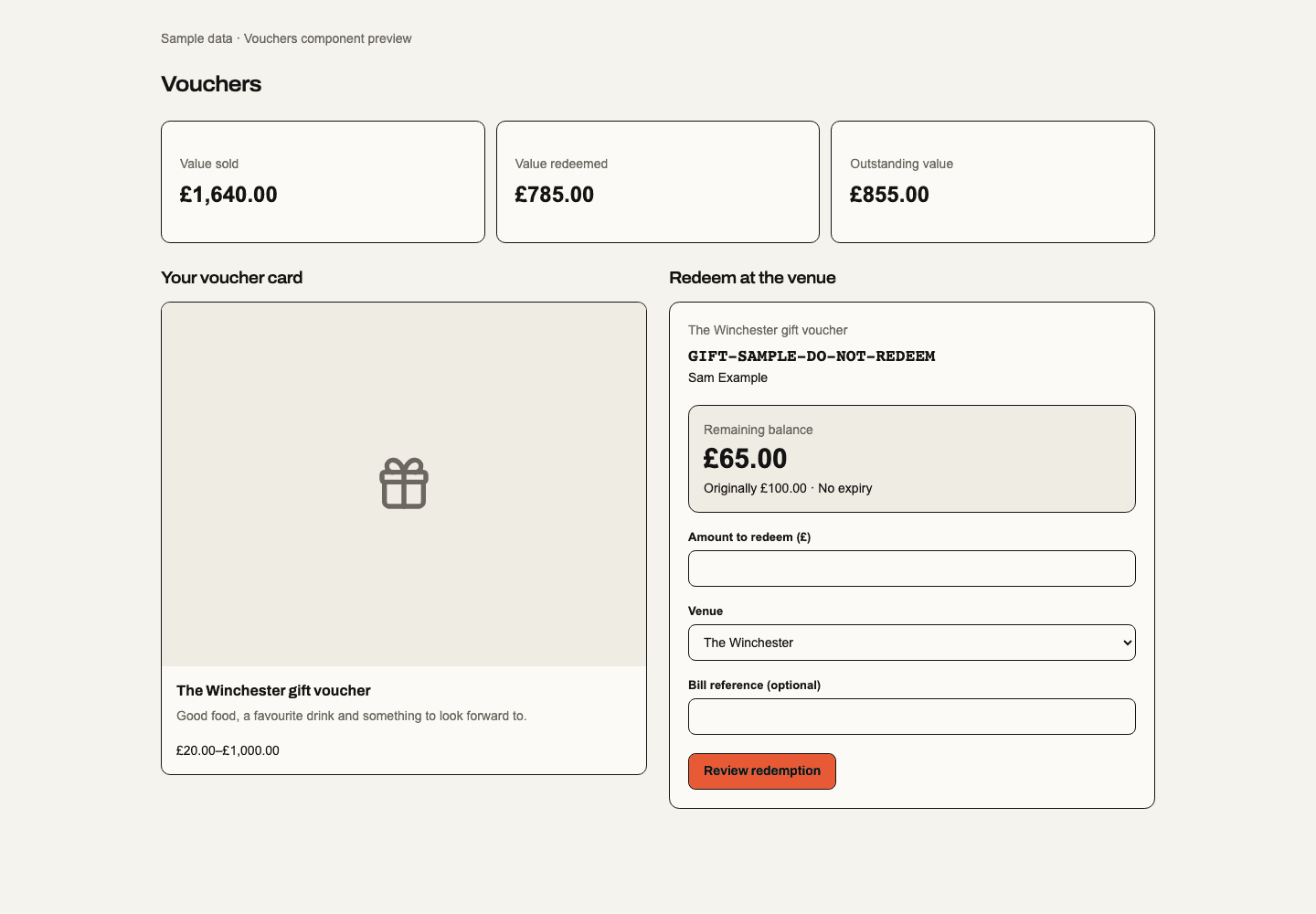
Prepared web module; production release, signed-in acceptance and real provider verification remain separate. Vouchers is separately enabled and permissioned. It uses shared Orders, seller Payment Profiles, customer contact snapshots, artwork and governed transactional email. Buying or receiving a voucher does not join Loyalty, merge customer identities or grant marketing consent.
Products, publication and embeds
Open Vouchers → Products and New voucher. Set the card name, description and optional JPEG/PNG/WebP artwork. The initial quick amounts are £20, £40, £60 and £100; edit them and choose whether customers may enter a custom amount. Minimum and maximum values are in pounds. Choose All venues in this business, Specific venues, or Across businesses. A group administrator with voucher management access can select the selling business and up to 24 other businesses in the same group with Vouchers enabled. Each accepting business still requires its own staff redemption permission. The product library groups cards into an all-venue collection and named venue collections, with search and a scope filter. A published card stays in its published venue collection while saved changes await publication; the card labels those changes separately. Group-wide collections list their accepting businesses. One business sells the voucher and owns its payment, shared balance, refunds and corrections; the ledger records which business accepted each redemption. This does not transfer money between businesses or settle their internal accounts. The accepting set is frozen at purchase: later additions do not gain access to old gifts. Membership, module availability and staff authority are checked again when accepting a voucher. Foreign-business code lookup reveals no purchaser or recipient contact details. A retired accepting scope before payment blocks checkout; retirement during payment enters the existing refund/reconciliation flow. Set a validity period in days or leave it empty for no expiry. Customer terms, a ready GB/GBP seller Payment Profile and voucher VAT treatment are required before publication. Confirm the voucher VAT treatment explicitly before publication. Single-purpose vouchers require an active VAT rate.
Save draft retains edits; Publish explicitly creates an immutable public version. Saving later edits does not replace the published version. Each purchase accepts one exact version and freezes its terms, amount, seller, tax and venue rules. Pause sales prevents new purchases while issued vouchers retain their recorded balances and terms.
Each saved product’s Embeds action opens its own placement library. Embeds also stores a named selection of one voucher product or a collection of up to 20 products from the same business. Copy its saved iframe code or open its saved preview. Draft and practice products are excluded from standard public embeds. Disable and re-enable update the saved embed. Installed snippets continue to use the same public identity. The initial embed uses image cards; Ticketing’s calendar and Event-specific options do not apply. Public embed identity grants no access to customers, purchased voucher codes or staff actions.
Create a voucher draft
Open Vouchers → Products → New voucher. Enter the name and description, set the amounts and accepting venues, then choose Save draft. Publishing is a separate step and requires the seller payment profile, customer terms and VAT treatment.
Customer card designer (prepared source)
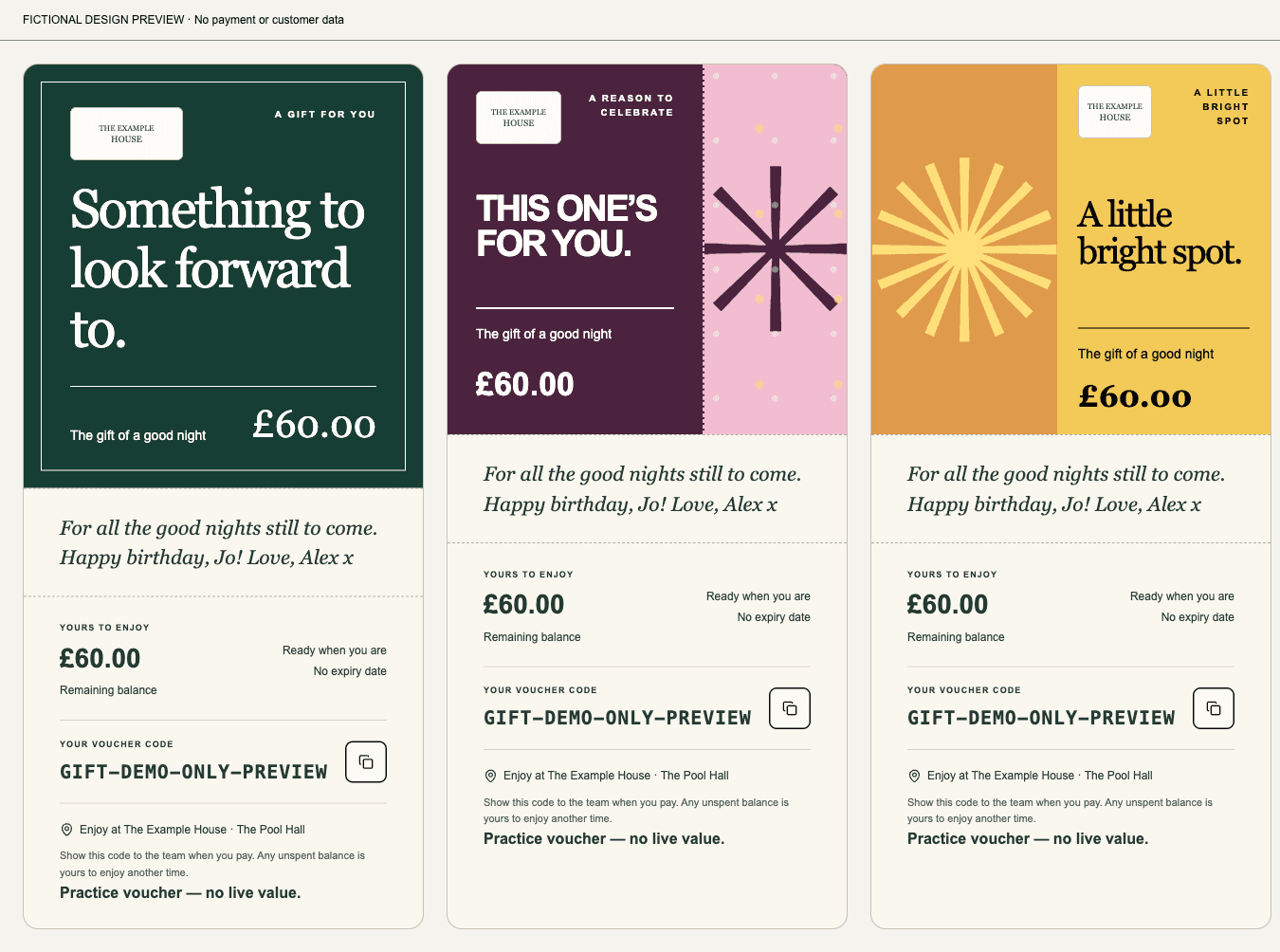
In a voucher product, Customer card designer → Let customers personalise their card enables a small editor in its embed purchase flow. Select the available Classic, Celebrate and Sunshine styles and optionally Allow a customer photo. Classic is a framed serif letter, Celebrate a bold ticket with a confetti panel, and Sunshine a postcard with a split photo or sunburst. Business branding accepts an optional logo from that business’s public media. No logo is required. Group-wide gift cards do not automatically display the group or issuer name; they list accepting businesses. Checkout still identifies the legal seller. Existing products keep their current purchase flow until this option is enabled and published. Staff still need voucher management access; customers need no Studio account or module access. Save and Publish remain separate.
Customers see a live card preview, choose an allowed style and custom card colour (or restore the design colour). Text on that solid colour automatically uses the higher-contrast black or white; photos remain separate from text. Add a heading of up to 100 characters over three lines and an optional 500-character message. If allowed, they can pick a JPEG, PNG or WebP photo up to 5 MB and 16 megapixels, adjust its position, replace it or remove it. Unsupported files show an error without discarding the previous photo. The venue's product name, value, issuer, terms, redemption rules and code cannot be edited. The optional logo and customer design are frozen when the customer continues to payment and appears on the paid purchase, private gift page and printed card. There is no free-form canvas or generated artwork.
Photos are resized and decoded again on the server with embedded metadata removed. Payment waits for the exact photo to be saved; a failed upload retries the same purchase and image. A photo belongs only to that private gift and is not added to the public catalogue or venue media library. Private photo reads require the matching purchase token or issued voucher code. Abandoned uploads with no payment attempt are removed after the purchase expires plus 24 hours; paid gifts and unresolved payment attempts retain their photo. A private photo that cannot load offers Retry photo. Desktop/mobile web and print share the card; this does not add a native editor. Release and signed-in/provider checks are still required.
Bookable experience gifts (prepared source)
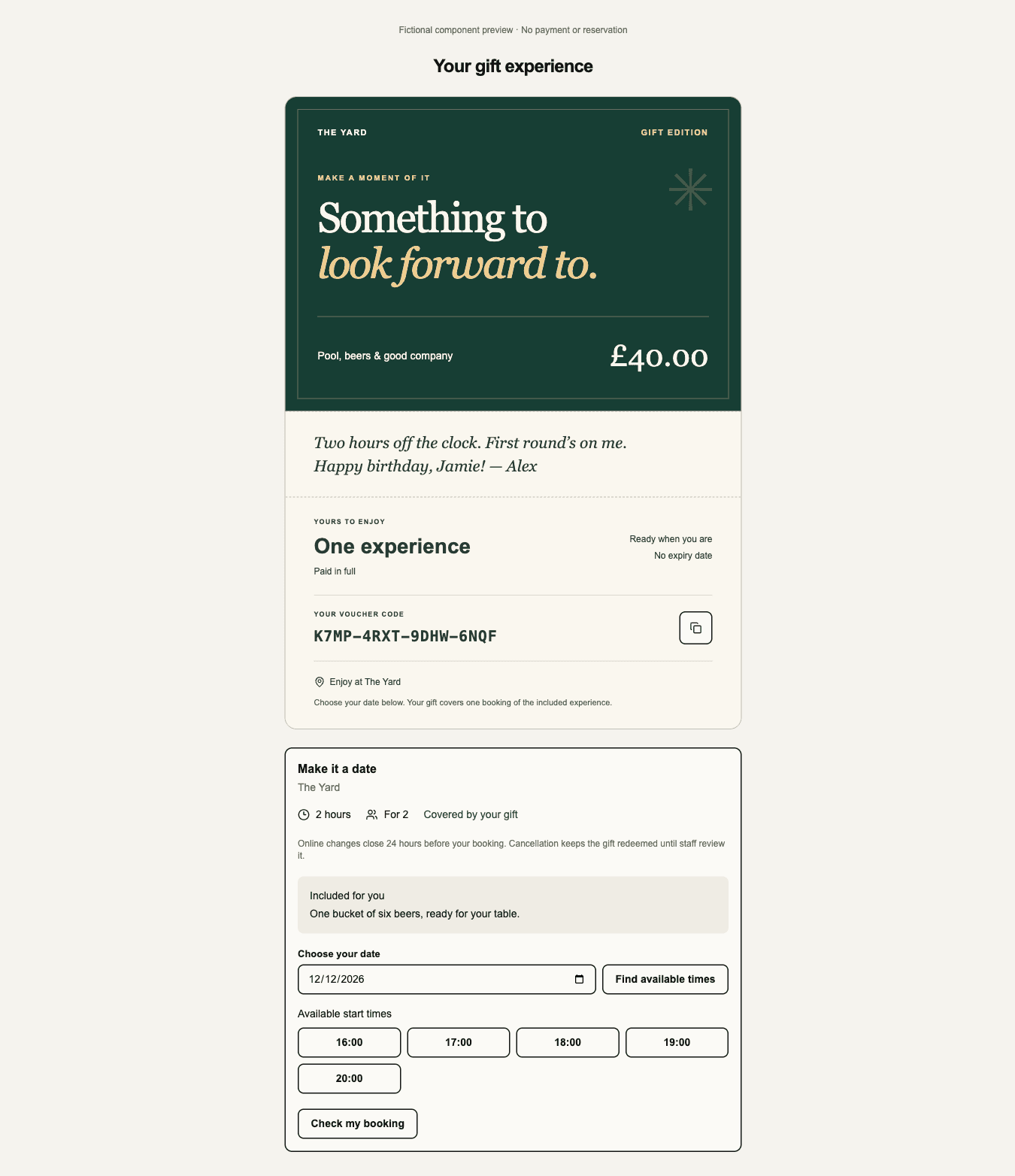
Choose New voucher → Gift type → Bookable experience. Select a published Bookings activity and activity-enabled portal, then set duration, guests, one fixed GBP price and optional Included on arrival extras. The activity must accept that duration and guest count. The gift belongs to the activity's venue. Save and publish are separate; each purchase freezes its package and original payment evidence. Money vouchers retain partial balances and all-venue options.
The recipient's private gift page shows the package and available start times. Book my experience creates one confirmed reservation and redeems the whole gift in the same transaction, with £0 further payment. Retries and competing tabs cannot reserve twice. Bookings' current opening hours, resources, buffers and capacity still apply; a failed reservation leaves the gift available. A newer public activity price does not change the package already purchased. An activity or portal withdrawn from sale is unavailable online; contact the venue.
Move to another date updates the same booking within the activity's change
policy and the venue's online-move setting. The original time stays reserved
until the replacement succeeds. Cancellation keeps the gift redeemed. In
Issued vouchers, staff with voucher correction and booking management access
may cancel an unstarted experience; staff with vouchers.correct may then
restore its recorded redemption with a reason. Restoration requires that exact
booking to be cancelled. Completed/started service cannot be silently reset.
The web Bookings running order labels the reservation Prepaid gift. Prepared native running-order source uses the same label; installed apps require a separate native build and acceptance. Its displayed value is a reference to the original gift; no second Order or payment is created. It cannot be invoiced again or spent as monetary voucher value. Refunds of an unbooked experience are whole-gift only; a booked gift must first be cancelled and restored before its original payment can be refunded.
This prepared web implementation supports one activity at one venue. Practice reservations, location-first portals and additional card-guarantee flows are not available. Included-on-arrival extras are frozen venue instructions; they do not reserve stock or create an add-on fulfilment claim. Native and live provider acceptance require separate evidence. No release is implied by this section.
Purchase and customer voucher
Choose an amount, enter purchaser details and optionally name a gift recipient. Accept the displayed terms, then continue to the shared secure card form. Spendable value is issued exactly once only after verified provider confirmation. The browser’s payment result alone cannot issue value. Changed terms, unavailable sales or invalid payment setup prevent another charge. Unknown outcomes resume the same purchase and payment identity. Pending purchase pages automatically recheck confirmation for up to two minutes, without starting another payment. Checks pause while the tab is hidden or offline and stop on a terminal result or when leaving the page. If confirmation takes longer, the page keeps an explicit status check and explains that customers should not pay twice.
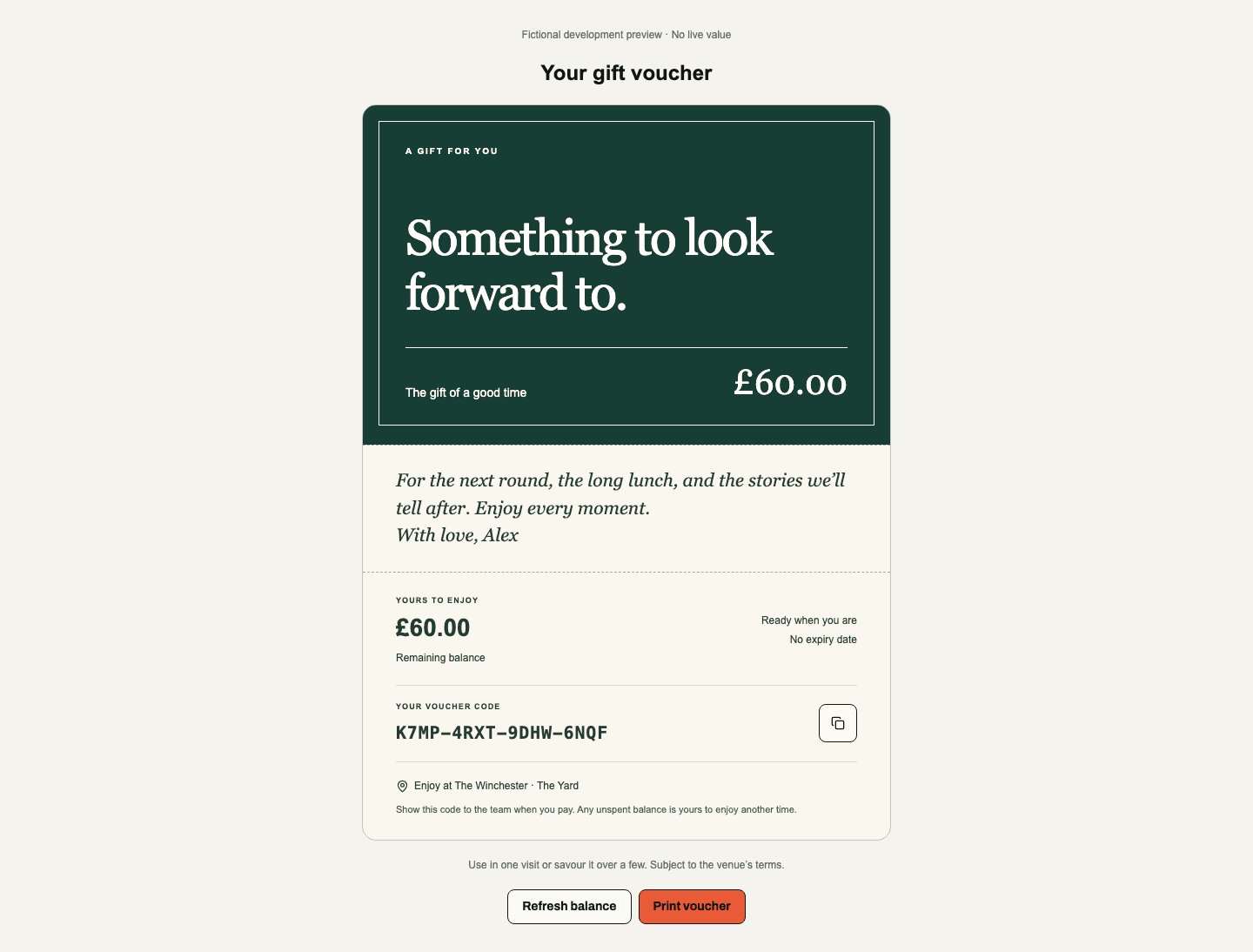
The purchaser and optional distinct gift recipient receive separately governed transactional messages containing the issued code, terms and a private voucher link. Delivery eligibility is checked again before dispatch; queued is not proof of delivery. The private link keeps its secret in the fragment and returns the voucher card, personal gift message, issuing seller, permitted venue names, value, balance, status and terms, without purchaser or recipient contact details. The recipient can unwrap a designed gift card, copy the code, refresh its balance or print a compact keepsake. Reduced-motion preferences suppress the opening animation; printing includes the card even before it is unwrapped. New codes use four groups of four characters, excluding I/O/0/1, with 80 random bits. Copy/paste, lowercase entry and spaces between groups are accepted. Existing GIFT-prefixed codes and private links remain valid.
Customer log, redemption and corrections
Issued vouchers searches code, purchaser and recipient in the current business, with pages of 20 records. Open a record to review contact snapshots, original value, remaining balance and paginated history. Redeem offers exact-code lookup. Enter the amount used and the redeeming venue, with an optional bill reference. Review redemption displays the amount and resulting balance; Confirm redemption applies it. A £100 voucher used for £35 keeps £65 available. Only a zero balance is fully redeemed. An expired, suspended, refunded or exhausted voucher cannot be spent. The server rejects stale balances, duplicate operation changes, excess amounts and venues outside its recorded scope.
Each use records staff attribution, venue, time, amount and balance. Authorised managers can reverse an exact recorded redemption with a reason. Repeated confirmation cannot restore value twice; the original entry remains. Staff must also record the voucher payment against the bill in the till; automatic till redemption is outside this prepared web slice.
Overview reads maintained totals for value sold, redeemed and outstanding, rather than scanning customer histories. Live vouchers and Practice vouchers keep their lists, balances and redemption commands separate. Test-funded value cannot enter a live command. Practice messages do not dispatch through live email.
Refunds use the original shared Order and seller. Claiming a refund fences redemption before provider work; only unspent value is available for an operator refund. External refunds remain recorded even if they conflict with spent value, and suspend that voucher for reconciliation. A pending or failed refund is not proof money returned. A definitive provider failure/cancellation, or the canonical executor’s proof that it never contacted the provider, releases only that refund hold. A suspended voucher requires an explicit reviewed financial reconciliation; this first slice has no general-purpose balance editor.
Access and verification boundary
| Capability | Authority |
|---|---|
vouchers.view | Read product records. |
vouchers.manage | Edit/publish products and manage saved embeds. |
vouchers.customers.view | Read issued customer records, history and value totals. |
vouchers.redeem | Lookup and redeem current-business vouchers. |
vouchers.correct | Reverse a recorded redemption with a reason. |
vouchers.settings.view / vouchers.settings.manage | Module settings access. |
When a business enables Vouchers and no current administrator can delegate product access, a deployment administrator can review first Voucher product access for one existing business administrator. This grants viewing, creating and publishing products and managing their saved embeds for that business. It carries no delegation, customer, redemption, correction or settings authority.
New legacy Vouchers viewer responsibilities include product viewing. New administrator responsibilities add product and Voucher settings management. Customer records, redemption, corrections and shared refund authority remain separately granted; existing immutable responsibility records are not rewritten.
Financial Order actions retain shared commerce refund and source authority. Vouchers grants neither Ticketing admission nor Loyalty rewards. Current module entitlement and source permissions apply; enabling a new entitlement cannot revive old pending purchases. This is web-only: Apple/Google Wallet, native apps, offline redemption, cross-seller settlement and online voucher spending in other checkouts remain outside this slice. The isolated development runtime blocks provider actions and delivery; local tests cannot certify Stripe checkout, received email or production availability.
Screens: /app/{orgSlug}/vouchers (Overview, Products, Issued vouchers, Redeem,
Embeds), /app/{orgSlug}/vouchers/settings, /embed/vouchers/{publicId},
/vouchers/purchase/{purchaseId} and /vouchers/view/{purchaseId}.